

A phone call or email should become a booking your whole team can see, not a note in one person’s diary that someone else has to copy later.
A caravan park booking system keeps each enquiry, provisional booking and confirmed stay in one live record. Your team can check dates, select a pitch, update the booking as the guest’s stay progresses and send confirmation by email. No paper diary to decipher. No second spreadsheet to keep in step.
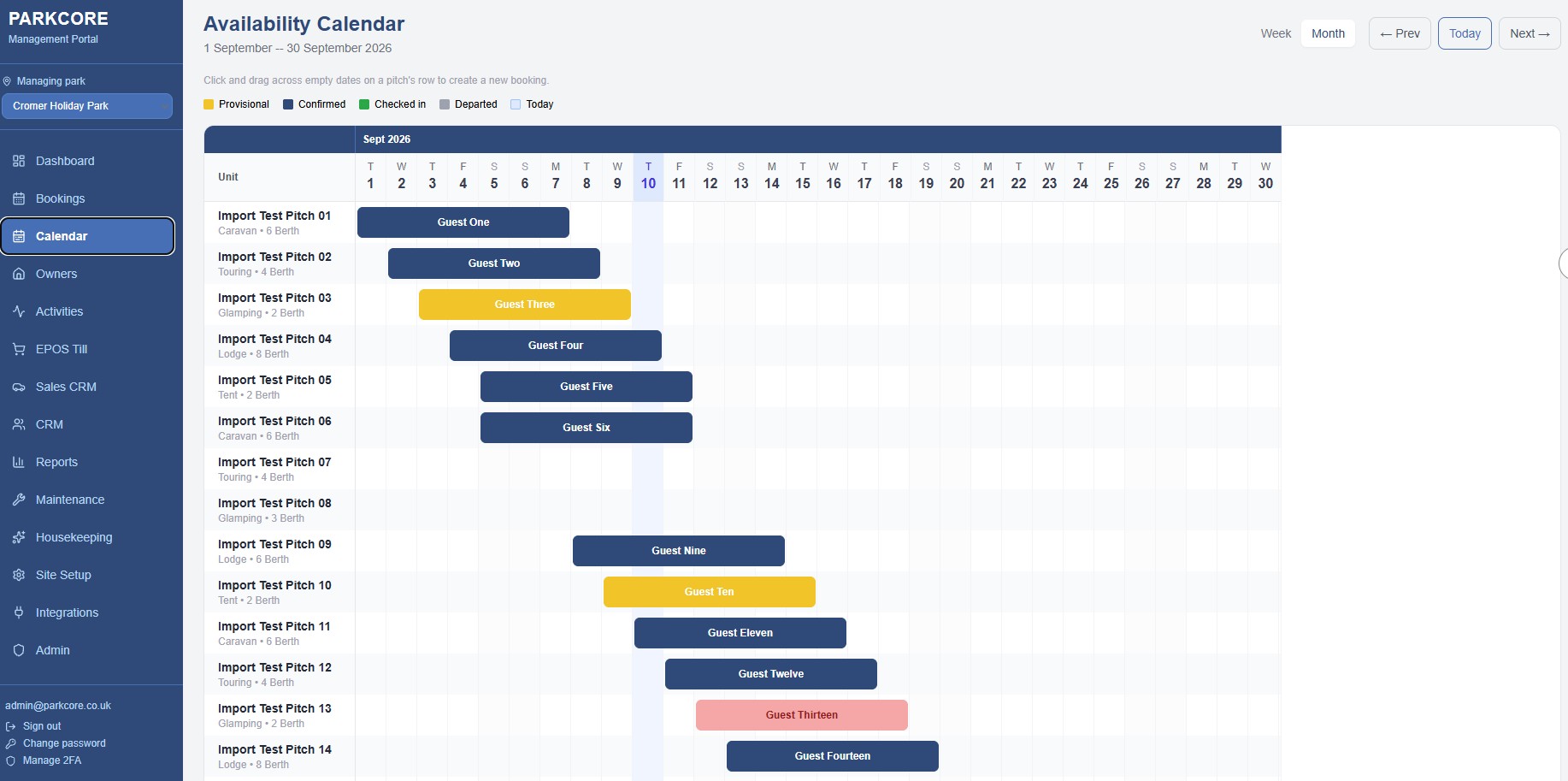
Parkcore manages bookings through four clear statuses: provisional, confirmed, checked-in and departed. Its 4-week availability calendar gives your team a view of upcoming occupancy, while date filters, unit selectors and CSV exports support everyday booking work.

Turn phone and email enquiries into visible provisional bookings
A guest may call while they are still comparing dates, or email with a question before deciding whether to book. If the only record is a note beside the phone, another member of the team may not know a pitch is being discussed.
Instead, record the enquiry against the dates and the relevant pitch. A provisional status shows that the booking is not yet confirmed, while making the enquiry visible to colleagues checking availability. Your team can return to the record, update it when the guest decides and avoid relying on memory or a message left at reception.
That distinction matters. An enquiry is not the same as a confirmed stay, and your availability view should not leave staff guessing which one they are looking at.
With Parkcore, the booking process can start at reception, by phone or by email. Your team can use date filters and a unit selector to find an appropriate available pitch for the guest’s touring caravan or motorhome, then record the provisional booking in the system.
Use booking statuses to keep the diary accurate
A booking moves through different stages. Giving each stage its own status helps your team see what needs attention and keeps the availability record useful.

- Provisional: The guest is considering the stay, and your team has recorded the enquiry or temporary booking. It is visible, but clearly not yet a confirmed stay.
- Confirmed: The booking is agreed. The dates and selected unit are recorded as a confirmed reservation, and an email confirmation can be sent automatically.
- Checked-in: The guest has arrived. Staff can update the booking so the team can distinguish today’s occupied stays from guests who are still due to arrive.
- Departed: The stay has ended. The booking remains in the record for reference, rather than disappearing from the diary.
These statuses are not just labels. They help staff understand whether a pitch is being discussed, has a confirmed booking, is currently occupied or has been vacated. That clarity supports availability decisions and helps you review confirmed business against the payments associated with it. A booking status is not a payment status, so keep those records distinct.
Find the right dates and pitch before you promise availability
When someone asks, “Have you got anything for those dates?”, staff need to check the actual date range and the available units, not scan a page of handwritten notes and hope nothing has changed since the last call.
Parkcore’s booking management includes date filters and unit selectors. Your team can narrow the search to the guest’s requested dates, view suitable available options and record the booking against the selected unit. This gives everyone a consistent place to check before confirming a stay.
A shared digital diary also reduces the risk of double bookings caused by delayed updates between paper and spreadsheet records. The essential discipline is straightforward: enter each booking into the same system as soon as it is taken, whatever the enquiry channel.
If you continue to accept bookings through an online travel agent (OTA), its commission terms still apply to bookings it supplies. Parkcore does not remove an external channel’s charges. It does give your team a central place to record and manage bookings, while bookings taken through Parkcore carry no Parkcore booking commission.
For example, Pitchup’s supplier page states a 15% commission on bookings it sends; check the current supplier terms and your own agreements before calculating your park’s costs. The practical point is to know which channel produced a booking and what you pay for it, not to mistake the software fee for an OTA fee.
See the next four weeks without flipping pages
A diary can record a booking, but it is harder to scan when you need to see the park’s availability across many pitches and dates. Parkcore’s 4-week availability calendar presents units and dates in a grid, so your team can spot booked periods, gaps and potential clashes at a glance.

This view is useful when taking calls, checking upcoming demand or reviewing the next few weeks with colleagues. Instead of comparing separate pages or tabs, staff can see the same calendar and update the relevant booking record.
The calendar is not a substitute for recording each enquiry and booking correctly. It works best when your team enters changes promptly and uses the booking status consistently. That simple routine keeps the view meaningful for everyone.
Send confirmation without writing the same email again
Once a booking is confirmed, guests need the details in writing and staff need a reliable record of what was agreed. Parkcore can send email confirmations automatically, reducing the need to draft and send each one manually.
That means less repeated admin and fewer opportunities to miss a confirmation when reception is busy. The booking record stays central, while the guest receives the confirmation by email.
If a guest’s dates or booking details change, update the record so the team is working from the current information. A paper note or an old spreadsheet copy can linger long after a change has been agreed; one shared booking record makes it easier to keep the diary current.
Export booking data when the week or season ends
A digital diary should support both the day’s work and the records you need to review later. Parkcore lets your team export booking data to CSV. That gives you a practical file for end-of-week checks, end-of-season review or further analysis in a spreadsheet.
CSV export is especially useful when your working routine includes a regular handover or a seasonal wrap-up. You can filter and review booking records without retyping each entry from a paper diary.
It also gives you a clear alternative to building an operational process around disconnected spreadsheets. Use the live booking system to manage current availability; export a CSV when you need a separate working file or archive.
What the paper diary costs in time and control
Paper can feel quick when one person is taking a booking. The problems tend to appear when another person needs the same information: a provisional enquiry is mistaken for a firm booking, a change is written in one place but not another, or staff cannot tell whether the guest has arrived.
Spreadsheets can help organise records, but they still depend on staff updating the right file and avoiding conflicting copies. Neither approach gives the team one shared booking lifecycle by itself.
A digital booking diary gives you:
- One record for each booking, from provisional to departed.
- Date filters and unit selectors to check the right options.
- A 4-week calendar to scan availability.
- Automatic email confirmations for confirmed bookings.
- CSV exports for periodic review.
- No Parkcore booking commission on bookings taken through Parkcore.
One clear price, with no setup fee
Parkcore costs £499 per month. There is no setup fee, no per-user charge and no booking commission charged by Parkcore. All modules are included from day one, so there is no separate booking-management tier to unlock.
The contract is rolling, with 3 months’ cancellation notice. Your data is UK-hosted and Parkcore is GDPR compliant.
Parkcore also handles data migration within 30 days or less. Your team can discuss how existing booking records should be brought across before changing the way the diary is managed. The aim is to move without asking reception to run two competing records indefinitely.
Put every booking in the same diary
A better booking process does not need to be complicated: record the enquiry, mark it provisional, confirm it when agreed, update it at arrival and mark it departed when the stay ends. Use the calendar to check availability, send confirmations without repeated manual emails and export records when you need them.
No paper diary to reconcile. No per-user charge. No Parkcore booking commission.
Book a practical Parkcore demonstration to see how your current booking process could work in one shared system.
Call us on +44 1248 665962