Holiday Park Booking Software: What to Check Before You Switch, and What It Should Cost

Switching your holiday park booking software should reduce cost, manual work and operational risk. It should not replace one set of problems with another.
Before you commit to a new system, check the workflow, migration process, contract, data controls and total cost. A modern platform should give your team one place to manage bookings, pitches, owners, guest records and daily operations.
It should also give you a clear answer to one commercial question:
What will this system cost in a normal year, including commissions, setup charges, users and add-ons?
1. Check the full cost before you check the feature list
A low monthly headline price can be misleading if the provider also charges:
- Commission on every booking.
- Fees for additional users.
- Separate charges for reports, marketing or owner management.
- Setup or onboarding fees.
- Per-site or per-pitch charges.
- Extra costs for data migration.
- Payment or integration mark-ups.
Ask for the complete annual cost in writing.
A simple OTA commission comparison
Suppose your park takes £350,000 in annual booking revenue and pays an OTA or booking platform a 15% commission.
| Cost | Annual amount |
|---|---|
| Booking revenue | £350,000 |
| 15% commission | £52,500 |
| ParkCore subscription at £499/month | £5,988 |
| Difference | £46,512 |
The calculation will vary according to your booking revenue and commission rate. However, the principle is clear: a flat subscription becomes more economical as direct booking volume increases.
ParkCore costs £499 per month. There is no booking commission, no setup fee and no charge for additional users. OTA commissions still apply to bookings generated by those OTAs, but ParkCore does not add another commission layer.
Use the ParkCore cost calculator to compare your current annual commission with a predictable flat fee.
2. Check that the booking lifecycle matches your operation
Your system should reflect what actually happens at reception. A single “booked” status is not enough.
Look for a clear booking lifecycle:
- Provisional: the space is held while the guest confirms details or payment.
- Confirmed: the booking is accepted and ready for arrival.
- Checked-in: the guest has arrived.
- Departed: the stay is complete and the unit can move into the next operational process.
Your team should be able to filter bookings by date range and select a specific unit or pitch without searching through separate spreadsheets.
The system should also produce email confirmations automatically and allow booking data to be exported as CSV. That matters when you need to share information with accounts, prepare reports or retain a working copy of your operational data.
A useful test during a demonstration is to ask the provider to:
- Find all arrivals for a specific date.
- Show bookings for one pitch or unit.
- Change a provisional booking to confirmed.
- Check a guest in.
- Mark the stay as departed.
- Export the filtered results to CSV.
If these actions require multiple screens or manual re-entry, the system may create more work rather than less.
3. Check the availability calendar with a real changeover scenario
A booking form is important, but your team will use the internal availability view more often.
A practical holiday park booking system should provide a 4-week availability grid showing every unit or pitch clearly. You should be able to see occupancy patterns, gaps and upcoming arrivals without moving through separate daily screens.
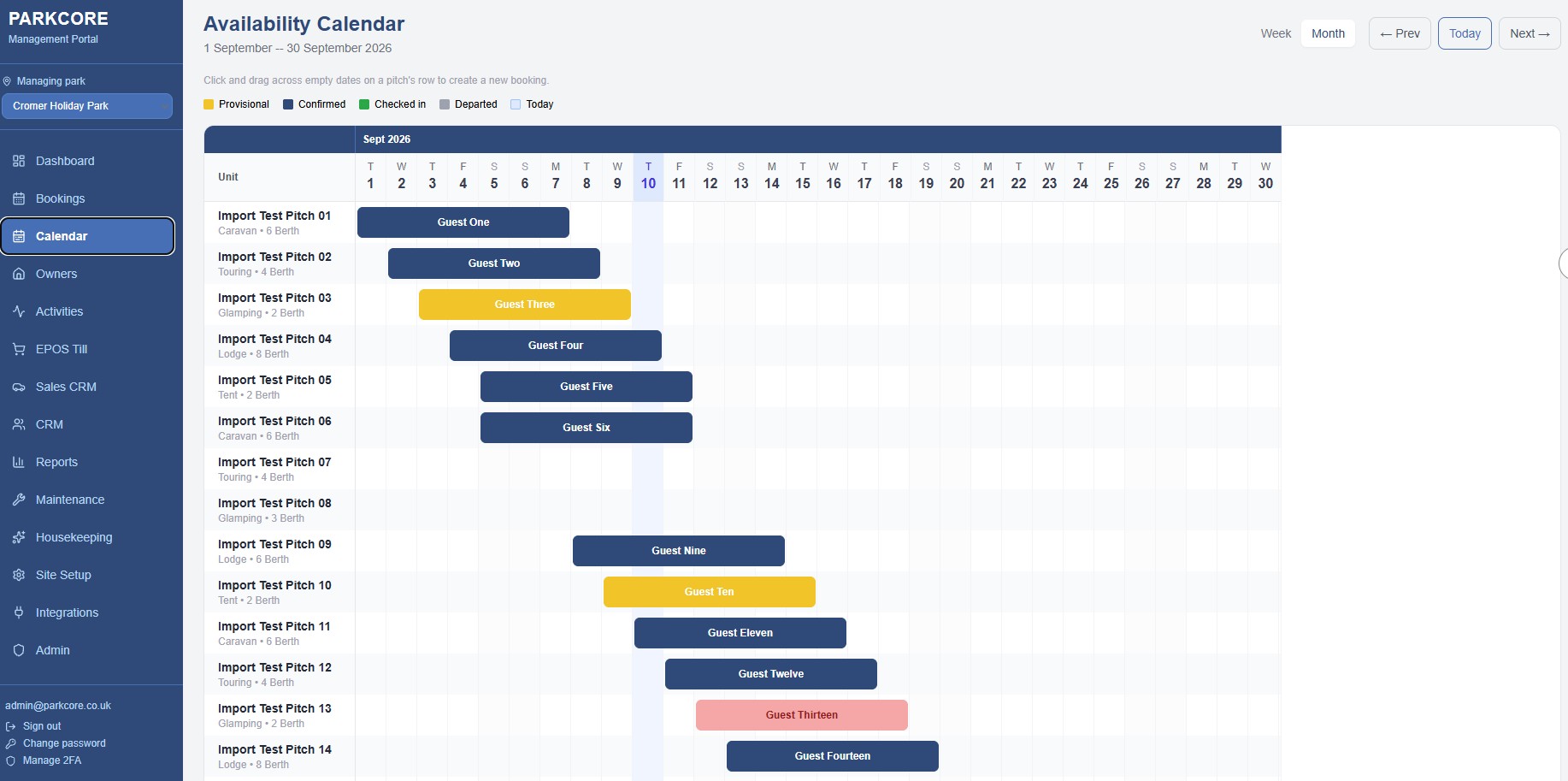
Test the calendar using a busy Saturday changeover. Ask:
- Can the receptionist see all units for the next four weeks?
- Are booking statuses visually clear?
- Can staff click a booking to view or manage it?
- Can the team identify an empty pitch for a five-night stay immediately?
- Can they select a unit or pitch directly when taking a phone booking?
A clear calendar reduces the need to cross-check multiple spreadsheets. It also gives managers a faster view of occupancy and future availability.
4. Check the migration process, not just the import button
A data import wizard is only useful if the migration process is structured.
Your new holiday park management software should support CSV and Excel imports for the information you already hold. That normally includes:
- Units and pitches.
- Existing and future bookings.
- Guest details.
- Owner records.
- Pitch assignments.
- EPOS stock where applicable.
ParkCore includes a guided Data Import Wizard. It helps map fields from your existing CSV or Excel files into the new system rather than requiring your team to retype everything.
The important questions are:
- Who prepares the files?
- Who checks the imported data?
- How are duplicate guests handled?
- What happens to existing bookings?
- How are owner records and pitch assignments checked?
- When does the old system stop being used?
- Who supports the team after go-live?
ParkCore provides full data migration within 30 days or less. The import itself is typically completed in two to five days once the required files are ready, while the wider process includes configuration, user setup, training and go-live support.

5. Check the guest CRM and consent controls
Your guest database should not be a by-product of the booking screen. It should be a usable business record.
A guest CRM should show:
- Contact details.
- Previous stays.
- Booking source.
- Relevant tags.
- Marketing consent.
- Preferences and visit history.
Consent tracking is essential. You should be able to distinguish between a guest who has provided marketing consent and one who has only provided an email address for a booking confirmation.
With a structured CRM, your team can build segments such as:
- Guests who have not stayed in the last six months.
- Guests who booked a particular unit type.
- Repeat direct-booking guests.
- Guests who came through an OTA.
- Guests who have consented to receive marketing.
ParkCore includes guest CRM, consent tracking, campaign tools and automated emails from the standard subscription. There is no higher “Pro” tier required to access these modules.
For more information about data responsibilities and privacy, see the ParkCore terms and privacy policy and the Information Commissioner’s Office guidance.
6. Check multi-park data separation
If you operate more than one park, confirm how the software separates sites.
You should be able to manage multiple parks under one account while keeping each site’s:
- Bookings.
- Guests.
- Owners.
- Units and pitches.
- Staff access.
- Reports.
- Operational data.
separate from the others.
This is more than a convenience. Clean data separation reduces the risk of sending the wrong email, assigning a booking to the wrong site or combining revenue figures incorrectly.
ParkCore supports multi-park management with separate site data and a central dashboard. Multi-park operators should contact ParkCore for volume pricing.
7. Check what is live, and what is still in development
Do not base a buying decision on a roadmap feature that is not yet available.
ParkCore’s accounting sync is in development and not yet live. The planned functionality is two-way synchronisation with accounting platforms such as:
- Xero.
- Quickfile.
- QuickBooks.
The aim is to keep invoices, payments and sales data aligned without manual exports or double entry. Xero beta availability is planned, with Quickfile and QuickBooks coming later, subject to provider charges and technical availability.
Until that functionality is live, you should not assume that accounting records will synchronise automatically. Ask what export or manual process is available today.
This is the kind of limitation a provider should state openly. Clear answers are more useful than vague promises.
What should holiday park booking software cost?
For ParkCore, the commercial terms are straightforward:
- £499 per month per park.
- Zero booking commissions.
- No setup fee.
- No migration fee.
- No per-user charges.
- All modules included from day one.
- No paywalled Pro tiers.
- Rolling contract.
- Three months’ notice to cancel.
- Full data migration within 30 days or less.
- UK-hosted and GDPR compliant.
The subscription includes booking management, the availability calendar, owner management, activities, EPOS, caravan sales CRM, guest CRM, email campaigns, marketing automation, housekeeping, maintenance, reporting, CSV/PDF exports, multi-park management and the data import wizard.
The right comparison is not £499 against another provider’s monthly headline price. Compare the full annual cost after commissions, users, add-ons, migration and setup charges.
Switching checklist
Before signing, confirm that your new provider can answer “yes” to these points:
- Does it support provisional, confirmed, checked-in and departed bookings?
- Does it include a 4-week availability grid?
- Can staff select units and pitches quickly?
- Are email confirmations included?
- Can your team export bookings and reports to CSV?
- Can it import your CSV and Excel files?
- Will existing bookings and owner records be migrated?
- Does it track guest marketing consent?
- Can you separate data across multiple parks?
- Are extra users included?
- Is the monthly price free from booking commission?
- Is the contract rolling with three months’ cancellation notice?
- Is accounting sync clearly labelled as live or in development?
If the answers are unclear, do not rely on assumptions. Ask for the details in writing.
Frequently asked questions
Is ParkCore a long-term contract?
No. ParkCore is a rolling contract. You can cancel with three months’ written notice. There is no minimum multi-year term.
Is there a setup fee?
No. There is no setup fee, onboarding charge or separate migration fee. The subscription is £499 per month per park, with all standard modules included.
Will migration disrupt our park?
The aim is to keep disruption low. ParkCore imports your existing units, bookings, owners and stock from CSV or Excel files, then supports team setup, training and go-live. Full migration is completed within 30 days or less, with the import itself typically taking two to five days once the data is ready.
What happens to our existing bookings and owner records?
Your existing bookings, units, owners and pitch assignments can be included in the migration. The imported data should be checked before go-live so your team can confirm dates, contact details and assignments.
Do extra users cost more?
No. ParkCore does not charge per user. Role-based access allows you to assign appropriate permissions to administrators, managers, reception staff and accounts users.
What is not included yet?
Accounting software sync is not yet live. Two-way connections for Xero, Quickfile and QuickBooks are in development. Confirm the current status before relying on automatic accounting synchronisation.
Make the cost and migration plan clear
The best booking system is not necessarily the one with the longest feature list. It is the one your team can use quickly, your data can move into safely and your business can afford to run all year.
Check the workflow. Check the calendar. Check the migration. Check the consent controls. Then compare the annual cost against the commission and manual work you currently pay for.
Book a tailored ParkCore demonstration to review your setup, compare costs and create a practical migration plan.
Call us on +44 1248 665962